Client feedback, without the email thread.
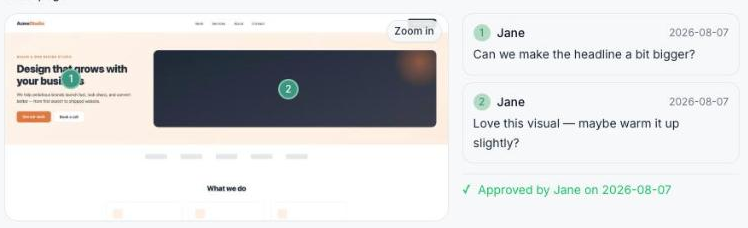
Share one link. Your client comments directly on the design—no sign-in, no screenshots, no "which version was this again?" When they're happy, they approve it with one click.
You know this part of the process.
You send a screenshot. The client replies in an email with "the button should be bigger, also see attached." Three days and two Slack threads later, you're still not sure which comment applies to which version, and nobody's actually said the word "approved." Pinpoint replaces that whole shuffle with one link.
How it works
Add what you want reviewed
Upload an image, or paste a live URL and Pinpoint captures it automatically — both the desktop and mobile view, so your client is reviewing what their site actually looks like. Add as many screens as the project needs.
Send one link
No client account, no password, no "check your email to verify." Your client opens the link and they're looking at the deliverable immediately.
Comments land exactly where they mean them
Your client clicks anywhere on the image and leaves a note pinned to that exact spot — on desktop or mobile, whichever they're looking at.
They tell you when they're done — without committing to "approved"
Pinpoint separates "here's my feedback for this round" from "this is approved," so a client can hand off a batch of notes without being pressured into signing off before they're ready.
You ship a revision, they see exactly what changed
New versions live on the same screen — v1, v2, v3 — with full comment history preserved. A new version always starts unapproved, so nobody's signing off on something that already changed.
One click, and it's official
When it's right, your client approves it. You've got a clean, timestamped record of who signed off and when.
Built for how creative review actually works
Real desktop and mobile review
A URL capture renders both viewports automatically. Your client reviews how their site actually looks on their phone, not a desktop layout shrunk to fit.
Zoom in without losing your place
Full-page captures can be long. A built-in zoom lets your client inspect detail without pinch-zooming a screenshot that's already too small.
Know the moment something happens
No dashboard-refreshing required — you're emailed when a client sends feedback and again when they approve.
Every project's status at a glance
Awaiting feedback, client reviewing, feedback received, or approved — see exactly where every project stands.
Feedback and approval, on purpose separate
Clients can tell you they've reviewed something without being forced to either approve it or say nothing at all.
Every revision, every comment, in order
Nothing gets overwritten. Version 2's comments don't get mixed up with version 3's, and an old approval never silently carries over.
Who it's for
Freelance designers and developers, and small agencies, who deliver visual work — websites, landing pages, mockups, UI — and are currently managing approval rounds through some combination of email, Slack, and hope.
Start free
Free
Get started with a couple of active projects. No credit card, no time limit.
Pro / Agency
Pro: up to 10 active projects. Agency: unlimited. Both for freelancers and teams running more than a couple of client relationships at once.
Questions
Does my client need to sign up for anything?
No. The link is the credential — they open it and start commenting. Nothing to install, no account to create.
What if I need to review a whole multi-page site, not just one screen?
Add a screen per page (Homepage, Pricing, Contact...) inside the same project. Your client gets one link that covers everything.
What happens when I ship a fix — does the client's old approval carry over?
No, deliberately. A new version always starts unapproved, so you're never accidentally treating outdated sign-off as current.
Can a client leave feedback without approving?
Yes — that's the point. "Feedback received" and "approved" are two separate, explicit signals.
Is this only for websites?
No — upload any image (a mockup, a logo, a PDF export as an image) the same way. URL capture with the desktop/mobile split is specifically for live websites.
Stop chasing feedback across five different threads.
Your first project is one click away — start with a 14-day free Pro trial, no credit card required.
Start free