A Frame.io alternative for freelance designers and developers
By Andreas Seifert, founder of Fyrro ·
If you're a freelancer or run a small agency, a review round often means a client looking at a homepage, landing page or mockup and explaining what needs changing. The feedback might arrive by email, then Slack, then a PDF full of notes.
Frame.io is designed for creative teams, with pricing per team member. Fyrro focuses on the client collaboration process, from the first brief to final approval. You pay for your account. Clients take part through a link.
How does Fyrro compare with Frame.io?
Fyrro covers the whole client process for websites and designs, from the first brief to approval, for one price per account. Frame.io focuses on review inside creative teams and charges per team member.
| Topic | Fyrro | Frame.io |
|---|---|---|
| Built for | Freelance designers, developers and small agencies delivering visual work to clients | Creative teams reviewing and managing creative work |
| Pricing model | Flat price per creator account; clients never need a paid seat | Per-member pricing; each paid team member needs a seat |
| Free plan | €0 with no time limit; 2 active projects per tool | $0; 2 members and 2 GB storage |
| Paid plans | Pro €29/month or €290/year for up to 10 active projects per tool; Agency €79/month or €790/year for unlimited projects | Pro $15 per member/month, up to 5 members; Team $25 per member/month, up to 15 members |
| Security accreditations | None yet; a data processing agreement is publicly available | Reports SOC 2 Type 2 compliance and TPN Gold Shield accreditation |
Frame.io information comes from its published pricing and security pages. Source check: 13 November 2026. Prices are in US dollars and may change. Check the latest details before deciding.
What does one client project look like, from brief to approval?
Before design starts, you send a Brief link. Your client answers questions about goals, audience, references and timeline, and you get an email when they submit.
Next, you send a Studio link. Your client tries font pairings and colour palettes on an example page and saves the direction they prefer. You get an email with their choice.
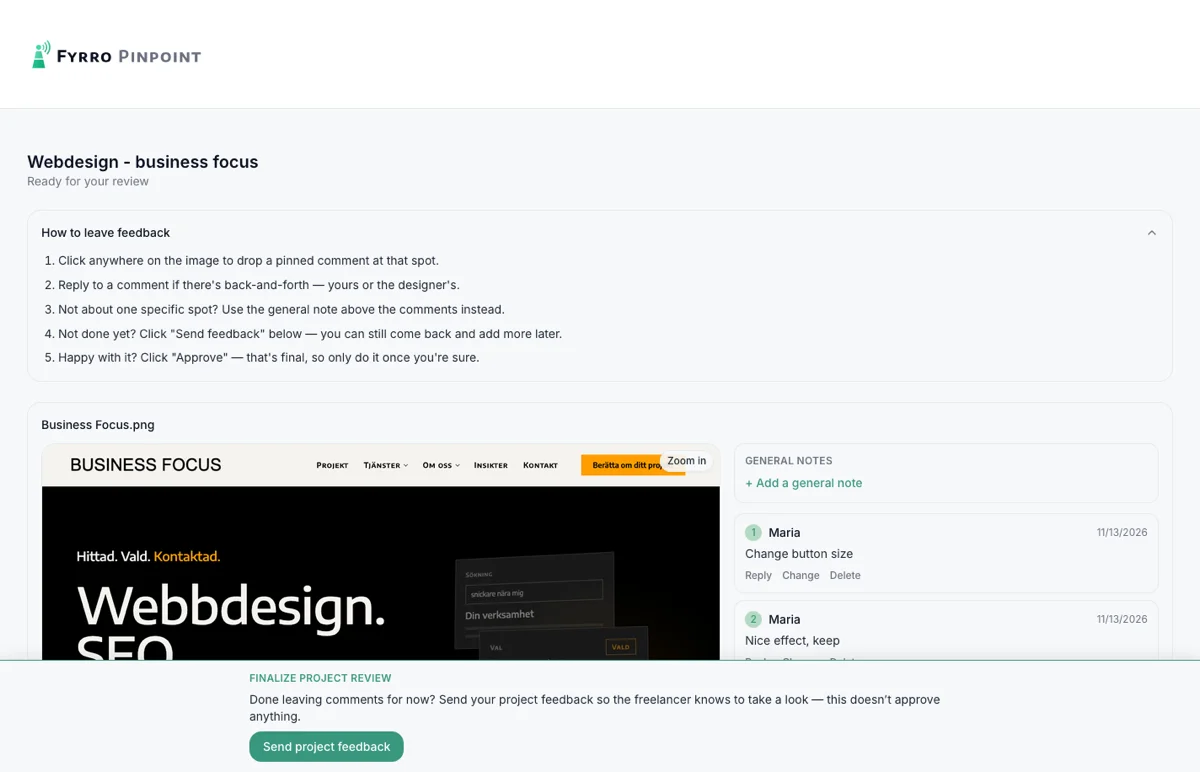
When the first design is ready, you add it to Pinpoint as an image or a live URL and share the review link.
Your client comments directly on the desktop or mobile view and sends the feedback round. Nothing is approved until they press Approve.
You upload the next version to the same screen. When your client approves it, Fyrro saves their name and the time with that version.
What do you get with Fyrro?
Brief collects goals, audience, references and timeline through one link. Your client's answers give you a clear starting point before you open the first design file.
Studio lets clients try font pairings and colour palettes on an example page, then save the direction they prefer.
Pinpoint lets clients comment on uploaded designs or captured website views and approve a specific version. Add a screen for each page, such as Homepage, Pricing and Contact, and keep the review under one shareable link.
One plan covers all three tools: Free at €0, Pro at €29/month or Agency at €79/month. These monthly prices apply to monthly billing. Annual plans cost €290 for Pro and €790 for Agency, saving two monthly payments. Agency also lets you add your logo and brand colour to client pages.
When is Frame.io the better fit?
Your workflow revolves around video reviews and collaboration within a creative team.
You need a provider with SOC 2 Type 2 compliance or TPN Gold Shield accreditation.
What are Fyrro's limits today?
Uploads are images only: PNG, JPEG or WebP, up to 15 MB each. Video and PDF files can't be reviewed yet. A PDF can only be attached to a comment.
Website capture creates a full-page desktop view, 1440 pixels wide, and a mobile view. There is no tablet view yet.
A screenshot can't show hover states or animations. For captured websites, a Live preview tab shows the real page next to the comments, but comments can only be added on the screenshots.
The review page your client sees is in English, even when you use Fyrro in Swedish, German or Spanish.
A Fyrro account is for one person. There are no team logins with separate access yet, and no integrations with tools such as Slack or Figma.
Each version is approved on its own. Approving version 3 doesn't approve version 2, and an approval never carries over to a new version.
Free includes 2 active projects per tool. Pro raises that to 10 and adds annotated PDF export, a note of when your client opened the link, and reminder emails you can send them. Agency has no project limit and adds your logo and brand colour to client pages.
Questions
Does my client need an account to comment or approve?
No. Your client opens the link and starts reviewing. Nothing to install, no account to create.
What happens to an approval when I upload a new version?
It stays with the approved version. The new version starts unapproved. A round of feedback can be submitted separately from approval.
Is Fyrro only for websites?
No. You can upload images of mockups, logos or PDF exports for review. URL capture creates separate desktop and mobile views of live websites.
Can I try Fyrro before paying?
Yes. Every new account starts with a 14-day Pro trial, no credit card required. When it ends, you move to Free. Nothing is charged unless you choose a paid plan.
Try Fyrro on your next client project
Start freeFree plan, no time limit. Try Pro free for 14 days, no credit card required. Cancel a paid plan anytime.