Fyrro vs Pastel
By Andreas Seifert, founder of Fyrro ·
Pastel and Fyrro's Pinpoint solve a similar problem: helping clients review websites and designs, leave feedback and approve work through a link without creating an account. Both are suited to freelance designers and small agencies.
Fyrro also covers the preparation before that review. Brief collects project information, and Studio helps you agree on a visual direction. In Pinpoint, submitting feedback and approving a version are separate actions.
How do Fyrro and Pastel compare?
Both let clients review websites and designs through a link without an account. Fyrro adds a brief and a visual direction before the review, and keeps feedback and approval as separate steps.
| Topic | Fyrro | Pastel |
|---|---|---|
| Client account | Not required; clients use the shared link | Clients can review and comment as guests |
| Trial | 14-day Pro trial without a credit card, then the Free plan | 14-day Pro or Team trial without a credit card; a Free plan is also available |
| Pricing model | Flat price per creator account; clients never need a paid seat | Fixed plan price with a set number of users; Pro includes 2 users |
| Free plan | €0 with no time limit; 2 active projects per tool | $0; 1 user and 1 active canvas |
| Paid plans | Pro €29/month or €290/year for up to 10 active projects per tool; Agency €79/month or €790/year for unlimited projects | Pro $35/month or $350/year, including 2 users and 3 active canvases; Team $119/month or $1,190/year |
| Workflow | Brief for client intake, Studio for visual direction, Pinpoint for feedback and approval | Feedback, reviews and approvals for websites and other creative assets |
| Data processing agreement (GDPR) | Yes, published on the website | Yes, published on the website |
Pastel information comes from its published pricing, product and data processing pages. Source check: 16 November 2026. Prices are in US dollars and may change. Check the latest details before deciding.
How do you review a multi-page website in Fyrro?
Create one Pinpoint project for the website and add a screen for each page, for example Homepage, Pricing and Contact.
Paste each page's URL. Fyrro scrolls the page so lazy-loaded images appear, then captures a full-page desktop view and a mobile view.
Share one link. Your client moves between the pages and switches between desktop and mobile on each one.
Each comment stays with one page, one device view and one version, so “the button is too small” always points to one place.
Each page is approved on its own. If the homepage is approved and the pricing page isn't, you can see that in your project.
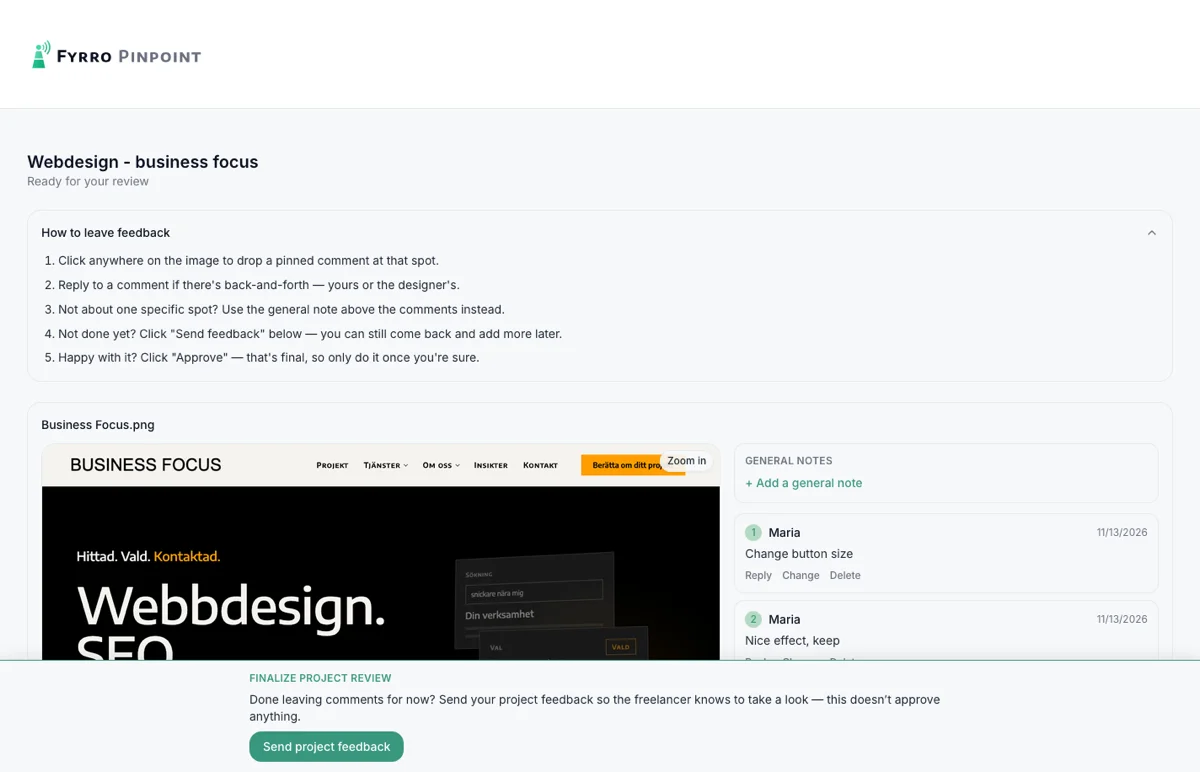
How does Fyrro handle the review?
Clients can finish a feedback round without approving the design. A new version always starts unapproved.
Each approval records who approved which version and when, so you can refer back whenever a question comes up.
Brief collects goals, audience, references and timeline. Studio lets clients explore fonts and colour palettes before design begins.
One subscription includes Brief, Studio and Pinpoint, with pricing in euros.
When is Pastel the better fit?
You primarily need feedback and approvals for websites, images, PDFs, videos and other creative assets, without a separate briefing or visual direction workflow.
You want a product with published customer stories and testimonials. Fyrro doesn't have those yet.
What are Fyrro's limits today?
Uploads are images only: PNG, JPEG or WebP, up to 15 MB each. Video and PDF files can't be reviewed yet. A PDF can only be attached to a comment.
Website capture creates a full-page desktop view, 1440 pixels wide, and a mobile view. There is no tablet view yet.
A screenshot can't show hover states or animations. For captured websites, a Live preview tab shows the real page next to the comments, but comments can only be added on the screenshots.
The review page your client sees is in English, even when you use Fyrro in Swedish, German or Spanish.
A Fyrro account is for one person. There are no team logins with separate access yet, and no integrations with tools such as Slack or Figma.
Each version is approved on its own. Approving version 3 doesn't approve version 2, and an approval never carries over to a new version.
Free includes 2 active projects per tool. Pro raises that to 10 and adds annotated PDF export, a note of when your client opened the link, and reminder emails you can send them. Agency has no project limit and adds your logo and brand colour to client pages.
Questions
Does my client need an account to comment or approve?
No. Your client opens the link and starts reviewing. Nothing to install, no account to create.
What happens to an approval when I upload a new version?
It stays with the approved version. Every new version starts unapproved, so an earlier approval cannot be mistaken for approval of the current work.
Can I review a whole website with several pages?
Yes. Add a separate screen for each page within the same project. Your client gets one link to review everything.
Can I try Fyrro before paying?
Yes. Every new account starts with a 14-day Pro trial, no credit card required. When it ends, you move to Free. Nothing is charged unless you choose a paid plan.
Try Fyrro on your next client project
Start freeFree plan, no time limit. Try Pro free for 14 days, no credit card required. Cancel a paid plan anytime.